
 Milk MoovementB2BAgriTech
Turning Operational Chaos into Clear Workflows

ROLE
Sole Product Designer
TIMELINE
Mar – Jun 2025
PLATFORM
Web, iOS, Android
TOOLS
Figma, Webflow, Bolt, Datadog
95%
Client Satisfaction
Score from clients who adopted the new navigation system
25%
Productivity Increase
For power users — no more time wasted looking for the right pages or having multiple tabs open
50%
Time Saved
By sales engineers stating it's now faster and clearer to walk new prospecting clients through the product
00 / Overview
Every gallon has a destination problem.
As the sole designer at Milk Moovement, I was responsible for designing and maintaining multiple product lines serving different user types across the dairy supply chain—from producers and drivers to plant receivers and administrators. Prior, the platform had grown organically, resulting in inconsistent experiences, overwhelming navigation, and workflows that didn't align with how different users actually worked.
TL;DR — Watch it in action
See the redesigned navigation before diving in
Short on time? Here's a quick walkthrough of the final navigation redesign — the full case study below explains the research and decisions behind it.

01 / PROBLEM + APPROACH
Lost in Translation
The Problem
- Users frequently got lost navigating the platform
- Inconsistent terminology across different regions
- Each user type needed specific pages but had access to everything
- Power users resorted to bookmarking or keeping multiple tabs open
- High cognitive load when searching for functionality
My Approach
- Conducted extensive user research across user segments
- Performed card sorting exercises for feature categorization
- Analyzed Datadog sessions across multiple regions
- Designed scalable, modular navigation system
- Created unified design patterns across all platforms
02 / RESEARCH
Navigation Redesign for Multiple User Types
To uncover the varied needs of different user types, I conducted comprehensive research including:
User Interviews

With the help of Granola AI, I spoke with dozens of users—teammates, admins, and first-time explorers across General Admin, Transportation, Pay, and Membership roles.
Existing UI Audit

Conducted exercises for each feature to understand mental models and expected groupings. I also analyzed existing navigation and page architecture for each of our major clients.
Datadog Analysis

Analyzed session recordings across multiple user segments for each region to identify pain points.
Usage Patterns

Discovered power users maintained 3-4 open tabs and bookmarked frequently-used pages.
KEY FINDINGS
Users were often lost with high cognitive load searching for pages
Users spent significant time searching for features and were often unable to find what they needed without keeping multiple browser tabs open.
Power users resorted to bookmarking pages or keeping multiple tabs open
Rather than navigating through the product, power users bookmarked specific pages or kept 3–4 tabs open permanently to access most-used features.
Terminology and sorting inconsistencies across all regions
Navigation labels, page names, and feature groupings varied across different regional deployments, creating confusion for users working across clients.
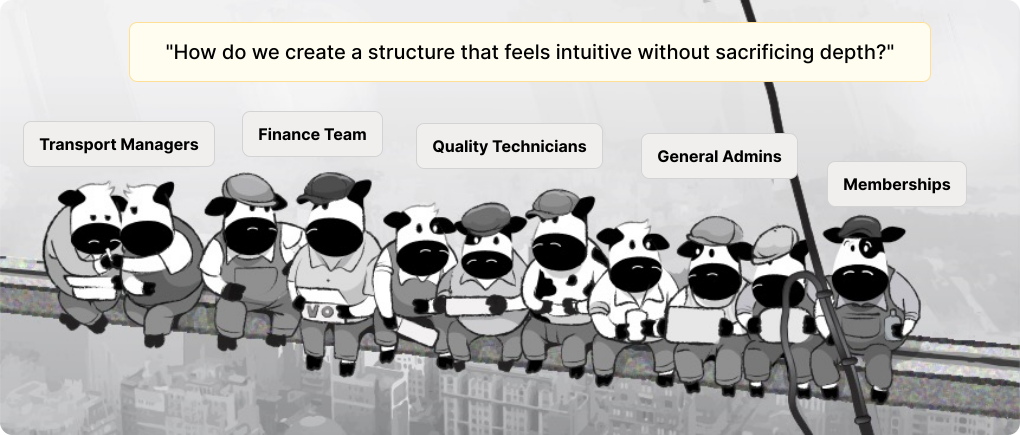
Each user type had specific pages they worked on and didn't want to see irrelevant sections
Finance teams, transport managers, quality technicians, and general admins had completely different primary workflows with minimal overlap.
03 / REQUIREMENTS
Embracing “Less is Moo-re” 🐮
I redesigned the navigation to improve usability, clarity, and scalability while maintaining all user permissions. The new structure surfaces essential features immediately and reduces clutter through a clear hierarchy that balances simplicity with flexibility. Frequently used features appear at the top level, while secondary options are revealed contextually to minimize cognitive load.
Prioritize Essential Items
Most frequently used features at top-level for quick access
Hierarchical Structure
Expandable categories that reveal secondary items contextually
Minimize Clutter
Clear terminology, visual segmentation with dividers
Scalability
Modular system for client-specific customization
Consistent Patterns
Collapsible menus, search integration, sticky navigation
Maintain Permissions
Preserve security while improving experience

I refined labeling, implemented consistent UI patterns (collapsible menus, icons with text, search, and sticky navigation), and added dividers between sections for better readability. The design scales to accommodate future client-specific categories without disrupting the user experience, and all security permissions remain intact. I also updated the Permissions page to align with the new navigation structure.

The navigation redesign revealed something crucial: users didn't just need better navigation—they needed better tools for working with complex data. Transportation managers were analyzing hundreds of routes. Quality teams were reviewing thousands of test results. Payroll processors were reconciling massive datasets across multiple cooperatives.
If I'd solved navigation but left data tables inconsistent and hard to customize, I'd only solved half the problem.
04 / Unexpected redesign
Unified Table Design + Customization
Making complex data clearer and more accessible without expensive custom development
Unified Patterns & Better Visibility

Optimized rendering for large datasets and implemented a responsive design with improved typography, status indicators and consistent interaction patterns across all tables.
Column Customization

Full column customization per-user for visibility and ordering
Enhanced Filters and Date

Custom filter combinations on both columns and date ranges
Design System Integration
These table enhancements became part of our broader design system, ensuring consistency across Platform, Transportation, Pay, and Membership modules. Every new feature could leverage these patterns, accelerating development while maintaining quality.
05 / IMPACT
Numbers that mattered to the business.
Outcomes measured through DataDog behavioural data, qualitative client research, and commercial contract results.
95%
Client Satisfaction
Score from clients who adopted the new navigation system
25%
Productivity Increase
For power users — no more time wasted looking for the right pages or having multiple tabs open
50%
Time Saved
By sales engineers stating it's now faster and clearer to walk new prospecting clients through the product
50%
Power User Adoption
Power-users across transportation and finance created custom filters and presets within 30 days
33%
Support Requests Reduced
Reduction of developer-specific table customization requests within the first 90 days
20%
Onboarding Time Saved
Saved by the Onboarding team on the next 3 new clients when ingesting their unique dataset
07 / learning
Reflections & Learnings
Understanding Different Workflows Through Research
The most valuable insight from this project was learning how deeply different each user type's workflow was. Transportation managers, quality administrators, payroll processors, and membership coordinators all approached the platform with completely different mental models and goals.
By conducting card sorting exercises, analyzing session recordings, and speaking directly with users across different regions, I was able to move beyond assumptions and design navigation that truly matched how people worked. The bookmark feature came directly from observing power users keeping multiple tabs open—instead of fighting that behavior, I designed for it.
Managing Multiple Teams Through Collaboration
As the sole designer supporting multiple product lanes, I had to work closely with different engineering teams working on Platform, Transportation, Pay, and Membership features. The key was establishing clear design systems and documentation that teams could reference independently, while maintaining regular sync points to align on larger initiatives.
Presenting user research data became crucial for getting buy-in. When I showed engineers Datadog recordings of users struggling to find features, or presented card sorting results that contradicted our current information architecture, it created shared understanding and urgency. Data-driven design decisions moved faster than opinion-based ones.
Building a Unified Design System
Working across web platform, driver app, receiver app, and producer app taught me the value of systematic thinking. Rather than designing each interface in isolation, I established core patterns—navigation structures, form patterns, table designs, status indicators—that could adapt across contexts while maintaining consistency.
This unified approach made the platform feel cohesive even as users moved between different modules or platforms. A driver who used the mobile app could more easily understand the web platform when needed, and vice versa. It also accelerated design and development velocity—once we had solid patterns, new features could be designed and built faster.
★★★★★
Joel is an exceptional product designer and was an absolute force at Milk Moovement. He was incredibly helpful when it came time to prototype thoughtful, credible solutions for marquee prospective customers, often on tight timelines and with real commercial stakes. Beyond pure design, Joel brought a strong go-to-market mindset. He was invaluable in creating sales enablement materials and collateral that actually reflected the product accurately while telling a compelling story for customers. Joel combines strong design taste with pragmatism and speed; a rare mix. Any team building and selling a serious product would be lucky to have him.



Thank You very Moo-ch for reading